When setting up a network, especially a high-speed one, understanding the compatibility between different optical components is crucial. One common question that arises is: Can I use a single mode SFP module with a multimode cable? To address this, let’s first break down the core elements involved—SFP modules, single mode and multimode cables, and their compatibility.
Understanding SFP Modules
SFP, or Small Form-Factor Pluggable, modules are crucial components in fiber optic networks. They function as transceivers that convert electrical signals to optical signals and vice versa. SFP modules come in various types, including those designed for single mode and multimode fibers.
Table of Contents
ToggleSingle Mode vs. Multimode Fiber
Single mode and multimode fibers differ primarily in their core size and the way they transmit light.
Single Mode Fiber: This fiber has a small core diameter (about 8-10 micrometers) and uses laser light for transmission. It’s designed for long-distance communication, often over several kilometers or even hundreds of kilometers. Single mode fiber provides high bandwidth and low attenuation, making it ideal for long-haul data transmissions.
Multimode Fiber: This fiber has a larger core diameter (50 or 62.5 micrometers) and uses LED light. It’s suited for shorter distances, typically up to 2 kilometers. Multimode fiber is often used within buildings or on campus networks where long distances aren’t necessary.
The Compatibility Question
Now, let’s dive into the compatibility issue. The core of the question is whether a single mode SFP can effectively work with a multimode cable.
Single Mode SFP with Multimode Cable: What Happens?
In theory, a single mode SFP module is optimized for use with single mode fiber. When used with multimode fiber, several issues can arise:
Signal Loss: Single mode SFP modules transmit light in a narrow beam that is specifically designed for single mode fiber’s small core. When you connect this to a multimode fiber with a larger core, much of the light can be lost or dispersed. This attenuation can lead to a significantly degraded signal quality and reduced communication range.
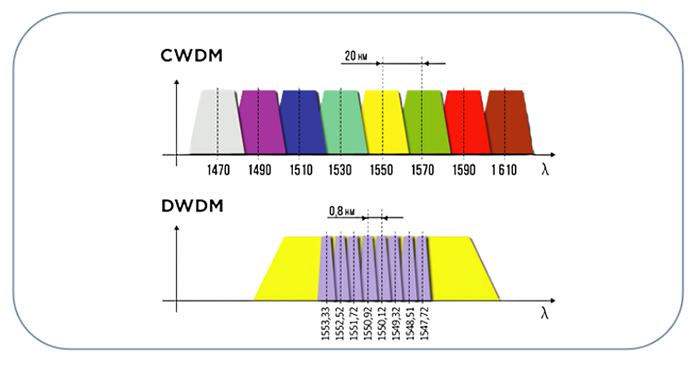
Mismatch in Wavelengths: Single mode and multimode fibers typically operate at different wavelengths. Single mode SFPs are often designed for wavelengths such as 1310 nm or 1550 nm, while multimode fibers are usually optimized for 850 nm. The difference in wavelengths can further contribute to signal loss and reduced performance.
Optical Coupling Issues: The physical design of single mode and multimode fibers means that the way light is coupled into the fiber is different. Single mode fibers are designed to accept a very narrow beam, whereas multimode fibers accept a broader beam. When you try to connect a single mode SFP to a multimode fiber, the mismatch in light coupling can lead to poor connectivity and signal degradation.
Possible Solutions and Workarounds
If you must use a single mode SFP module with multimode cables, consider the following:
Use a Mode Conditioning Patch Cable: This type of cable can help mitigate some of the issues by including a special fiber segment that conditions the light before it enters the multimode fiber. However, this is more of a workaround and might not fully resolve all compatibility issues.
Opt for an Appropriate SFP Module: The best solution is to use an SFP module designed for multimode fiber if you’re using multimode cables. Multimode SFPs are specifically designed to work with multimode fibers and will provide optimal performance for your network.
Practical Considerations and Recommendations
Having established that using a single mode SFP with multimode cables is generally problematic, let’s look at practical considerations and recommendations to ensure your network runs smoothly.
Evaluating Your Network Needs
Before making any decisions, evaluate your network’s requirements. Consider the following factors:
Distance Requirements: Determine the distance between your network devices. If the distance is short, multimode fiber and SFPs designed for multimode will likely be sufficient. For longer distances, single mode fiber and SFPs might be necessary.
Bandwidth Requirements: Assess the bandwidth and speed requirements of your network. Single mode fibers typically offer higher bandwidth capabilities, making them suitable for high-speed data transmission over long distances.
Cost and Budget: Single mode fibers and their associated SFP modules can be more expensive than multimode options. Consider your budget and the cost of replacing cables or SFPs if necessary.
Best Practices for Fiber Optic Networks
To avoid issues related to fiber optic compatibility, follow these best practices:
Match Components: Ensure that your SFP modules, fiber cables, and other optical components are all compatible with each other. Using components designed for the same type of fiber (single mode or multimode) will provide the best performance.
Regular Testing: Implement regular testing and maintenance procedures to ensure that all optical connections are functioning properly. This can help identify and resolve issues before they impact your network’s performance.
Consult Experts: If you’re unsure about the compatibility of your optical components, consult with a network specialist or the manufacturer. They can provide guidance on the best solutions for your specific setup.
Conclusion
In summary, while it is technically possible to use a single mode SFP with a multimode cable, it is not recommended due to the significant risk of signal loss and performance degradation. The ideal approach is to use components that are designed to work together, ensuring optimal performance and reliability for your network.
By understanding the differences between single mode and multimode fibers and choosing the appropriate SFP modules, you can build a robust and efficient network that meets your needs. Proper planning and component matching are key to achieving the best results in your optical network setup.