Understanding the difference between an SFP (Small Form-Factor Pluggable) cable and identifying cable failure can save you from significant network disruptions and costly repairs. This article breaks down the steps to differentiate between the two and offers practical tips for troubleshooting.
SFP cable, cable failure, network troubleshooting, SFP vs. cable failure, diagnosing cable issues, network maintenance, SFP module
In the world of networking, the reliability of your connections is paramount. Ensuring that your equipment, particularly your cables, is functioning correctly can mean the difference between smooth operations and frustrating downtime. One common dilemma faced by IT professionals is distinguishing between an SFP (Small Form-Factor Pluggable) cable and a cable failure. This article provides a comprehensive guide to help you make this determination with confidence.
Table of Contents
ToggleUnderstanding SFP Cables
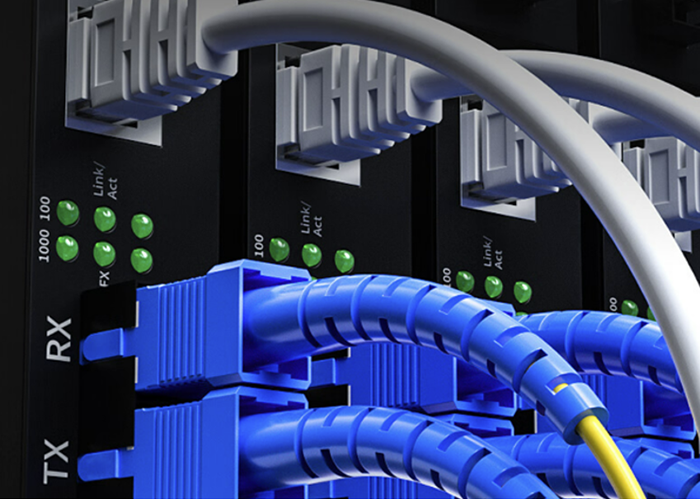
SFP cables, also known as mini-GBICs (Gigabit Interface Converters), are compact, hot-swappable input/output devices used for data communication and telecommunications. They interface with a variety of network equipment, including switches, routers, and network interface cards (NICs). SFPs support various communication standards such as Ethernet, Fiber Channel, and SONET/SDH, making them highly versatile and widely used.
Key Characteristics of SFP Cables:
Modularity: SFPs are modular, meaning they can be easily swapped in and out without shutting down the system. This feature allows for flexibility and quick upgrades or replacements.
Compatibility: They are compatible with different types of network devices and can support both copper and fiber optic cables.
Variety: SFP modules come in various types, including SX, LX, ZX, and more, each designed for specific distance and speed requirements.
Signs of a Functioning SFP Cable
Before jumping to conclusions about a potential cable failure, it’s important to understand what a properly functioning SFP cable looks like:
Stable Link Light: When connected, an SFP cable should show a stable link light on both ends, indicating a good connection.
Correct Module Identification: Network devices should correctly identify the SFP module, and it should be listed in the device management interface without any errors.
Expected Performance: Data should be transmitted at the expected speed and reliability without noticeable degradation or packet loss.
Common Causes of SFP Cable Failures
Despite their reliability, SFP cables can encounter issues. Understanding common causes of failures can help in diagnosing problems more effectively:
Physical Damage: Cables can be damaged by physical impacts, excessive bending, or improper handling during installation or maintenance.
Environmental Factors: Extreme temperatures, humidity, and dust can affect cable performance, especially in less controlled environments.
Connector Issues: Dirty or damaged connectors can cause poor signal quality or loss of connection. Regular inspection and cleaning can mitigate this.
Compatibility Problems: Using incompatible SFP modules or connecting them to non-compatible devices can lead to failures. Always check compatibility before installation.
Troubleshooting SFP Cables vs. Identifying Failures
When you encounter connectivity issues, it’s crucial to systematically troubleshoot to determine whether the problem lies with the SFP cable or elsewhere. Here are some steps to help you with this process:
Check Physical Connections: Ensure that the cable is properly connected and there are no loose or damaged connectors. Physical inspection can often reveal obvious issues.
Inspect for Damage: Look for visible signs of wear and tear on the cable and connectors. Any signs of damage could indicate the need for replacement.
Swap with a Known Good Cable: Replace the suspect cable with a known working one. If the problem resolves, the original cable is likely at fault.
Test with Different Devices: Connect the cable to a different device to see if the issue persists. This can help determine if the problem is with the cable or the original device.
Advanced Diagnostics
If basic troubleshooting doesn’t resolve the issue, advanced diagnostics may be necessary:
Use a Cable Tester: Specialized cable testers can measure the integrity of the SFP cable, identifying issues like signal loss, attenuation, or interference.
Examine Log Files: Network devices often log errors related to connectivity issues. Checking these logs can provide insights into whether the problem is cable-related.
Firmware Updates: Ensure that all network devices, including SFP modules, have the latest firmware updates. Incompatibilities and bugs can sometimes be resolved with updates.
When to Replace Your SFP Cable
Knowing when to replace an SFP cable is crucial to maintaining network integrity. Here are some indicators that replacement is necessary:
Persistent Issues: If connectivity problems persist despite troubleshooting efforts, it’s likely time to replace the cable.
Visible Damage: Any visible physical damage should prompt immediate replacement to avoid further network issues.
Obsolete Technology: Older SFP cables may not support newer network standards or speeds. Upgrading to newer modules can enhance performance and compatibility.
Conclusion
Distinguishing between an SFP cable and a cable failure is a critical skill for maintaining a reliable network. By understanding the characteristics of SFP cables, recognizing signs of failure, and following systematic troubleshooting steps, you can ensure your network remains robust and efficient. Regular maintenance and timely upgrades are essential practices for preventing disruptions and optimizing performance.
In conclusion, staying proactive about network maintenance and understanding the intricacies of your equipment can save you from the headaches of unexpected downtime. Whether you’re a seasoned IT professional or new to the field, these insights will help you keep your network running smoothly.
By breaking down the complexities of SFP cables and cable failures into manageable steps, this article aims to equip you with the knowledge and confidence to tackle network issues head-on. Remember, a little preventative care and regular maintenance go a long way in ensuring seamless network operations.
Frequently Asked Questions
Q:Can 1G SFP work with 10G SFP
A:Yes, technically, a 1G SFP can physically fit into a 10G SFP port, but it will not work as intended. The mismatch in data rates will likely result in communication errors, link instability, and degraded network performance. Mixing different SFP speeds can lead to potential issues such as data packet loss, increased latency, and network congestion.
To address these issues when mixing 1G and 10G SFPs, it is recommended to use media converters or rate-selectable SFP modules that can adapt to different speeds. These devices can help bridge the gap between different SFP speeds and ensure compatibility within the network.
From a current perspective, with the advancement of technology and the widespread adoption of higher network speeds, it is becoming increasingly important to maintain uniformity in SFP speeds to optimize network performance and reliability. Therefore, it is advisable to avoid mixing 1G and 10G SFPs whenever possible to prevent potential compatibility issues and ensure seamless network operation.
Q:Do Walsun appliances support direct attach cable (DAC)?
A:Yes, Walsun appliances support a passive DAC in release 10.5 and later.
Q:Which port must I insert the DAC into?
A:DAC is inserted into the 10G port on the appliance.
Q:Does the 1G port support a DAC?
A:No. The DAC might fit into a 1G port but is not supported.
Q:How can I order a DAC?
A:Contact your Walsun sales representative to order a DAC.
Q:Can I mix DAC and fiber transceivers on the same appliance?
A:Yes. You can mix DAC and fiber transceivers on the same appliance. Each 10G port supports both options.
Q:Can I mix SFP+ fiber and DAC in ports that are part of the same link aggregation channel?
A:No. There must be symmetry between all elements in the same link aggregation channel.
Q:Which transceivers use the MPO type connector?
A:Only 40G QSFP+ SR4 transceiver and 100G QSFP28 SR4 transceivers use the MPO type connector. All other fiber transceivers use the LC type connector.
Q:Are special adapters required for 25G, 50G, and 100G ports?
A 100G port can support five speeds: 10G, 25G, 40G, 50G, and 100G. 1G speed is not supported on the 100G port. 50G and 100G ports use the same transceiver. The appliance determines the speed, and not the port.
Only 50G/100G (QSFP28) and 40G (QSFP+) transceivers can be directly used on a QSFP28 interface. Use a QSA28 adapter on a QSFP28 interface to use 10G (SFP+) and 25G (SFP28) transceivers.
Related Article:
Unlocking the Potential Can SFP28 Run at 1GB
Can SFP 10G LR Modules Support 1G Unlocking the Potential of Your Network
Can You Use a 10G SFP in a 1G Port_ Understanding Compatibility and Best Practices