Understanding the differences between 1G and 10G SFPs is crucial for ensuring optimal network performance. This article will guide you through the key distinctions, helping you identify which SFP you have and how to make the most of your network infrastructure.
SFP, 1G SFP, 10G SFP, network performance, fiber optics, transceiver, data transfer, IT infrastructure, networking equipment
Table of Contents
ToggleIdentifying Your SFP: The Basics
When setting up or maintaining a network, it’s vital to know whether your Small Form-factor Pluggable (SFP) transceiver is 1G or 10G. This distinction affects your network’s speed, capacity, and overall performance. So, how can you tell the difference? Let’s dive into the basics of SFPs and explore the key identifiers.
Understanding SFPs
SFPs are compact, hot-pluggable transceivers used for both telecommunication and data communications applications. They interface network devices like switches and routers with fiber optic or copper networking cables. The SFPs allow for flexible and scalable networking, enabling the transfer of data over short and long distances.
1G SFPs, also known as SFP, support data rates up to 1.25 Gbps. They are commonly used in Gigabit Ethernet applications, suitable for most standard networking needs. On the other hand, 10G SFPs, referred to as SFP+, support data rates up to 10 Gbps, catering to high-bandwidth needs like data centers and enterprise networks.
Visual Inspection
One straightforward way to identify if your SFP is 1G or 10G is by visually inspecting the transceiver. Manufacturers often label their products with relevant information. Look for any inscriptions or stickers on the module. Typically, you might find “1G” or “10G” clearly indicated.
Additionally, the connectors can give you a hint. 1G SFPs usually have a simpler design compared to the more complex 10G SFP+ modules, which may have additional components to handle higher data rates.
Checking the Part Number
Each SFP module has a unique part number that can tell you a lot about its specifications. You can usually find this part number on the label of the SFP. Once you have the part number, look it up on the manufacturer’s website or in the product documentation. This will provide you with detailed information about the module’s capabilities, including whether it is 1G or 10G.
Using Network Equipment Interfaces
Modern network equipment, such as switches and routers, often have built-in tools to identify connected SFP modules. By accessing the device’s interface, either through a command-line interface (CLI) or a web-based graphical user interface (GUI), you can retrieve detailed information about the connected SFPs.
For example, in Cisco devices, you can use the show interface command to display information about the connected transceiver, including its type and speed. This method provides a reliable way to verify whether your SFP is 1G or 10G without needing to physically inspect the module.
Performance Testing
Another method to determine whether your SFP is 1G or 10G is to perform a network speed test. By measuring the data transfer rate between devices connected through the SFP, you can infer the module’s capacity. If the observed speed is around 1 Gbps, you likely have a 1G SFP. If it approaches 10 Gbps, then it’s a 10G SFP.
Performance testing can be particularly useful if you have multiple SFPs installed and need to confirm their specifications without physically handling each one. However, this method requires proper network setup and testing tools.
Advanced Identification Techniques
Beyond basic inspection and network equipment interfaces, there are more advanced methods to identify your SFP type. These techniques involve deeper analysis and specialized tools but can provide more precise information.
Digital Diagnostics Monitoring (DDM)
Many modern SFPs come equipped with Digital Diagnostics Monitoring (DDM) capabilities, also known as Digital Optical Monitoring (DOM). This feature allows you to monitor the performance and status of the SFP in real-time. Through DDM, you can access various parameters such as temperature, voltage, bias current, and received optical power.
To utilize DDM, you’ll need compatible network equipment and management software that supports this feature. By accessing the DDM data, you can get a detailed view of the SFP’s performance, including its maximum supported data rate. This is a definitive way to confirm whether you have a 1G or 10G SFP.
Consulting Manufacturer Documentation
When in doubt, consulting the manufacturer’s documentation is always a reliable approach. Manufacturers provide comprehensive datasheets and manuals for their SFP modules, detailing specifications, supported standards, and usage guidelines. These documents can help you verify the exact type of SFP you have.
You can usually find these documents on the manufacturer’s website. Searching by the part number or model name will lead you to the right resources. This method ensures you have accurate and authoritative information about your SFP module.
Using Network Management Software
Network management software, such as Cisco’s Prime, Juniper’s Network Director, or HP’s Intelligent Management Center, can help you manage and monitor your network devices, including SFP modules. These tools provide detailed reports and analytics on the connected hardware, making it easy to identify whether your SFP is 1G or 10G.
Such software often includes inventory management features, allowing you to keep track of all SFP modules in your network. This is especially useful for large-scale networks where manually checking each SFP would be impractical.
Benefits of Knowing Your SFP Type
Understanding whether your SFP is 1G or 10G is not just a technical detail; it has significant implications for your network’s performance and scalability.
Network Performance: Matching the SFP type with your network requirements ensures optimal data transfer rates and minimizes bottlenecks.
Cost Efficiency: Using the appropriate SFP helps avoid over-investment in unnecessary high-speed modules or underperformance from insufficient ones.
Future-Proofing: Knowing your current SFP type aids in planning future network upgrades and expansions. It helps in selecting compatible equipment and ensuring smooth transitions to higher speeds.
Troubleshooting: Accurate identification of SFP modules assists in troubleshooting network issues, making it easier to isolate and resolve problems.
Conclusion
In conclusion, identifying whether your SFP is 1G or 10G involves a mix of visual inspection, part number verification, network equipment interfaces, and performance testing. For more advanced identification, leveraging DDM capabilities, consulting manufacturer documentation, and using network management software can provide precise and reliable information. By understanding your SFP type, you can optimize your network performance, ensure cost efficiency, and effectively plan for future upgrades.
Frequently Asked Questions
Q:Can 1G SFP work with 10G SFP
A:Yes, technically, a 1G SFP can physically fit into a 10G SFP port, but it will not work as intended. The mismatch in data rates will likely result in communication errors, link instability, and degraded network performance. Mixing different SFP speeds can lead to potential issues such as data packet loss, increased latency, and network congestion.
To address these issues when mixing 1G and 10G SFPs, it is recommended to use media converters or rate-selectable SFP modules that can adapt to different speeds. These devices can help bridge the gap between different SFP speeds and ensure compatibility within the network.
From a current perspective, with the advancement of technology and the widespread adoption of higher network speeds, it is becoming increasingly important to maintain uniformity in SFP speeds to optimize network performance and reliability. Therefore, it is advisable to avoid mixing 1G and 10G SFPs whenever possible to prevent potential compatibility issues and ensure seamless network operation.
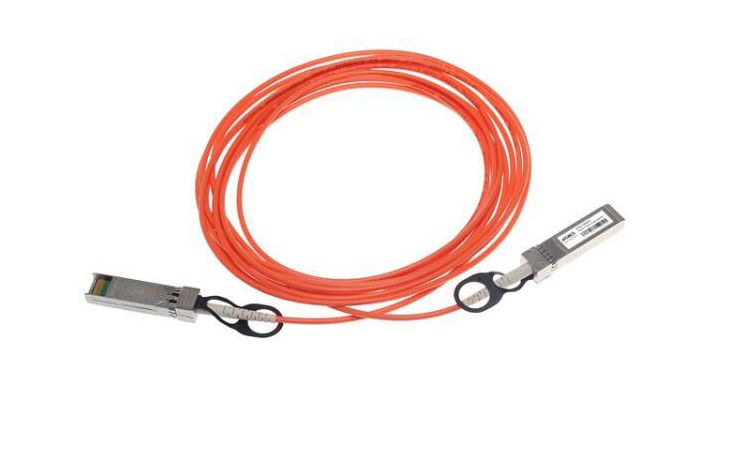
Q:Do Walsun appliances support direct attach cable (DAC)?
A:Yes, Walsun appliances support a passive DAC in release 10.5 and later.
Q:Which port must I insert the DAC into?
A:DAC is inserted into the 10G port on the appliance.
Q:Does the 1G port support a DAC?
A:No. The DAC might fit into a 1G port but is not supported.
Q:How can I order a DAC?
A:Contact your Walsun sales representative to order a DAC.
Q:Can I mix DAC and fiber transceivers on the same appliance?
A:Yes. You can mix DAC and fiber transceivers on the same appliance. Each 10G port supports both options.
Q:Can I mix SFP+ fiber and DAC in ports that are part of the same link aggregation channel?
A:No. There must be symmetry between all elements in the same link aggregation channel.
Q:Which transceivers use the MPO type connector?
A:Only 40G QSFP+ SR4 transceiver and 100G QSFP28 SR4 transceivers use the MPO type connector. All other fiber transceivers use the LC type connector.
Q:Are special adapters required for 25G, 50G, and 100G ports?
A 100G port can support five speeds: 10G, 25G, 40G, 50G, and 100G. 1G speed is not supported on the 100G port. 50G and 100G ports use the same transceiver. The appliance determines the speed, and not the port.
Only 50G/100G (QSFP28) and 40G (QSFP+) transceivers can be directly used on a QSFP28 interface. Use a QSA28 adapter on a QSFP28 interface to use 10G (SFP+) and 25G (SFP28) transceivers.
Related Article:
SFP-CWGE27-80C 1.25G CWDM SFP 1270nm 80km LC SMF DDM Transceiver Module
TRENDnet TEG-MGBS10 Compatible 1000Base LX SFP 1310nm 10km LC SMF DDM Transceiver Module
SFP-GE35-2BX20 1000Base 2 Channels BX BIDI CSFP TX1310nm-RX1550nm 20km LC SMF DDM Transceiver Module
SFP-GE55-ZX 1000Base SFP ZX 1550nm 80km LC SMF DDM Transceiver Module
SFP-DWGE17-120C 1.25G DWDM SFP C17 100GHz 1563.86nm 120km LC SMF DDM Transceiver Module