Ensuring your network operates smoothly often boils down to making the right hardware choices, and selecting the correct Small Form-factor Pluggable (SFP) module is a key part of this. SFP modules are hot-swappable, compact devices used to connect network equipment like switches and routers, allowing for network flexibility and scalability. However, with numerous options available, knowing whether an SFP module is compatible with your equipment can be daunting. Here’s a comprehensive guide to help you make an informed decision.
1. Understanding SFP Modules: The Basics
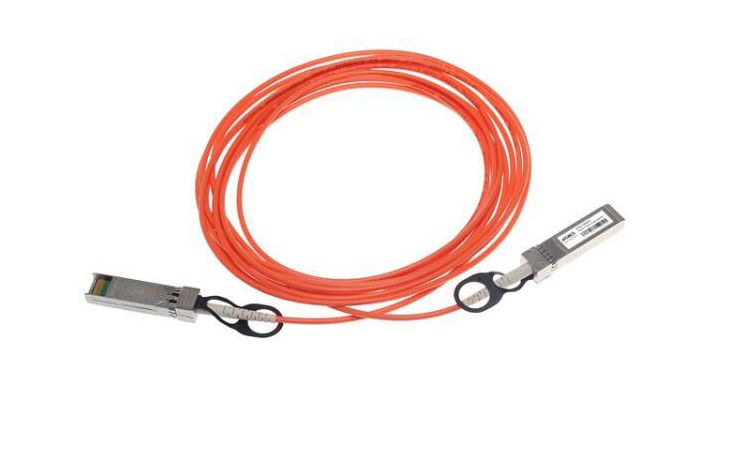
SFP modules come in various types and specifications, tailored to different network requirements. The basic function of an SFP module is to convert electrical signals into optical signals (and vice versa), facilitating communication between network devices. The types of SFP modules include:
SFP: Standard, typically used for 100 Mbps to 1 Gbps connections.
SFP+: Enhanced version, supporting data rates up to 10 Gbps.
QSFP/QSFP+: Quad Small Form-factor Pluggable, designed for higher data rates up to 40 Gbps and beyond.
CWDM/DWDM SFP: Coarse and Dense Wavelength Division Multiplexing, used for long-distance communication.
2. Manufacturer Compatibility
One of the most critical aspects of SFP module compatibility is ensuring that the module is compatible with the manufacturer of your network equipment. Many network device manufacturers, such as Cisco, Juniper, and HP, produce their own SFP modules. While third-party modules are available and often more cost-effective, they may not always be compatible with specific brand equipment due to proprietary technologies or firmware restrictions.
To verify compatibility:
Consult Manufacturer Documentation: Always refer to the compatibility list provided by your equipment’s manufacturer. These lists detail which SFP modules are officially supported.
Firmware and Software Updates: Ensure that your network device’s firmware is up-to-date. Some compatibility issues can be resolved through updates.
Third-Party Compatibility Guarantees: If you opt for third-party SFP modules, choose reputable vendors that guarantee compatibility with your specific equipment.
3. Understanding Fiber Types and Distances
Compatibility is also determined by the type of fiber optic cable and the required transmission distance. SFP modules are designed to work with either single-mode fiber (SMF) or multi-mode fiber (MMF):
Single-Mode Fiber (SMF): Suitable for long-distance transmissions (up to 80 km or more), commonly used in metropolitan or long-haul networks.
Multi-Mode Fiber (MMF): Best for shorter distances (up to 2 km), often used within buildings or campus networks.
When selecting an SFP module, consider the distance your signal needs to travel and choose accordingly. For example, modules labeled as “SX” are typically for short-distance multi-mode applications, while “LX” modules are for longer single-mode distances.
4. Data Rate Compatibility
Another key factor is the data rate compatibility between the SFP module and your network equipment. Ensure that the module supports the same data rates as your devices. Mismatched data rates can lead to communication failures and reduced network performance. Common data rates include:
Fast Ethernet (100 Mbps)
Gigabit Ethernet (1 Gbps)
10 Gigabit Ethernet (10 Gbps)
5. Interface and Connector Types
The physical interface and connector type of the SFP module must match your equipment. SFP modules typically use LC connectors, but it’s important to verify this with your specific device’s requirements. Some devices might use different connector types, and using the wrong one can prevent a proper connection.
6. Temperature Range and Environmental Considerations
Operating environments can vary widely, and so can the specifications of SFP modules regarding temperature ranges. Standard SFP modules are designed for typical office environments, but if your equipment is located in a harsh environment (such as outdoor installations or industrial settings), you’ll need a module rated for a wider temperature range, often referred to as “industrial” or “rugged” SFP modules.
7. DDM (Digital Diagnostic Monitoring)
Digital Diagnostic Monitoring (DDM) allows real-time monitoring of parameters such as optical output power, optical input power, temperature, laser bias current, and transceiver supply voltage. DDM-enabled SFP modules provide valuable insights into performance and can alert you to potential issues before they cause network disruptions. If maintaining high network reliability is crucial, opt for SFP modules with DDM capabilities.
8. Budget Considerations
While it’s tempting to go for the lowest-cost option, it’s important to balance cost with reliability and performance. Cheaper, third-party SFP modules may save money initially but can incur higher costs in the long run if they fail or cause network issues. Consider the total cost of ownership, including the potential need for replacements or troubleshooting time.
9. Future-Proofing Your Network
As network demands grow, so does the need for faster and more reliable connections. When selecting an SFP module, consider not just your current needs but also future requirements. Investing in higher-capacity SFP modules now can save you from costly upgrades later. For instance, if your network might need 10 Gbps speeds in the near future, opting for SFP+ modules now can be a smart choice.
10. Seek Expert Advice and Reviews
If you’re unsure about the compatibility of an SFP module, seek advice from network professionals or peers who have experience with similar equipment. Online forums, customer reviews, and professional networks can provide valuable insights and recommendations. Additionally, many vendors offer pre-sales support to help you choose the right product.
11. Testing and Validation
Before fully deploying new SFP modules, it’s wise to test them in your network environment. This can help identify any compatibility issues or performance problems early on. Use a phased deployment approach, starting with a small number of modules and gradually scaling up as confidence in their compatibility and performance grows.
12. Keeping Abreast of Technological Advances
The field of networking technology is continuously evolving. New standards, improved module designs, and enhanced compatibility features are regularly introduced. Stay updated with the latest developments to make informed decisions about SFP modules. Subscribing to industry newsletters, attending webinars, and participating in trade shows can help you stay informed.
Table of Contents
ToggleConclusion
Choosing the right SFP module involves considering multiple factors, including manufacturer compatibility, fiber type, data rates, environmental conditions, and budget. By taking a methodical approach and leveraging available resources, you can ensure that your network runs efficiently and reliably. Remember, the goal is not just to find a compatible SFP module, but to select one that best meets your network’s current and future needs.
Navigating the complexities of SFP module compatibility may seem challenging, but with the right information and resources, you can make confident, informed decisions. Keep this guide handy as a reference, and don’t hesitate to seek expert advice when needed. Your network’s performance and reliability depend on making the right choices today for a seamless tomorrow.